
I’m posting this blog entry a while after the development actually occurred because I was busy with the site and social media setup. But I plan on posting a blog/vlog entry every week to keep track of the project’s progress.
A quick background on porting to Unity
While I am experienced programming C# and using Adobe Animate, I am brand new to Unity. So far, I am really happy with Unity because it provides so many functionalities out-of-the-box. Arborlands actually has a Flash (now Adobe Animate) prototype that I programmed a few years ago using ActionScript 3.0, which is Flash’s native scripting language. When I did this, I did not use any game SDK or library, so I was programming everything from scratch – collisions, events… everything! I now realize this was not a particularly good use of my time 😅. But that’s ok, it’s all about learning. As you are probably aware, Flash is now pretty much out the door and is not a viable engine for the game, so I picked Unity because it has a large community and uses C# for coding. Thus far, I’m really impressed how quickly I’ve been able to import the main avatar’s animation to Unity. Everything seems to be straight-forward.
Up ‘til now…
This week is the first week of work I will be documenting in the blog/vlog. A quick summary of what happened before this week:
- I studied some basic Unity Tutorials
- I imported the main character animation
- Created point-and-click character navigation
- Worked on the graphical assets for land tiles
This Week (2nd week of April)
For the purposes of this project, I’ll be counting Mondays as the first day of each week.
The second full week of April started on Monday 2021-04-12 and it was a good week of progress for Arborlands. I already had the little Arborian running around on the screen and now needed to design some terrain.
The land you walk on
It took me a while to draw land that looked right to me. This meant a lot looking at landscape art of other artists to see how it gets done.
It also meant paying a lot more attention to what the ground looks like when I walk outside (I may have freaked out a lawn or two by staring too closely 🙄). I tried a few different methods, but in the end decided to go with a colorful but minimalistic look for the base grass tiles.
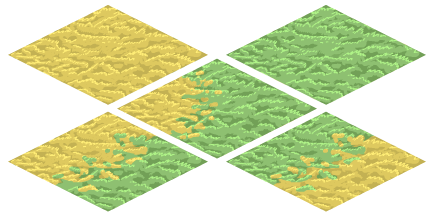
It was interesting to arrive at the “less-is-more” look. More detailed/realistic attempts often didn’t look right when zoomed out. Beyond that, more detailed drawings obviously take more time, so while it wasn’t easy to throw away tiles that I worked on for a long time (😢), it will be less effort in the long run.
⭐Lesson learned – let go of things that don’t work, even if I spent a lot of time on them.
The next challenge was blending tiles together. Whenever I had a tile of one type touching another tile, I wanted to create a nice blending effect between the two tiles.
At first, I tried to create a tile for each type of blend:
- Yellow grass to light grass
- Light grass to dark grass
- Dark grass to yellow grass
But then I quickly realized I would have to create a tile for every combination of blends.
Just think about it:
- A green tile with a yellow blend on the north
- A green tile with a yellow blend on the north and south
- A green tile with a yellow blend on the north and south, and a dark green blend on the east??
This would become astronomically unworkable! So instead, I exported mostly transparent tiles with one side blended.
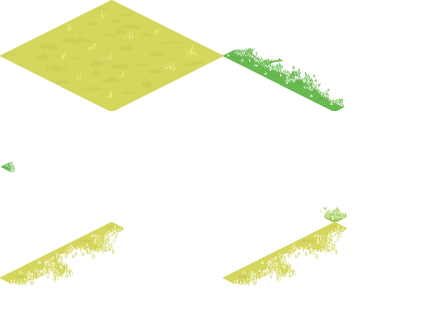

With these simple blends, I can overlay blends over existing solid tiles to create any blend I wanted. For tiles that have more than one side blended, I added additional tilemap layers. These usually have no terrain on them, but I can use them to place blends when they are needed. Theoretically, I might end up needing more layers; I will add them as needed. This was a fun little technique that I’m pretty happy with, but please, let me know if there is an easier way.
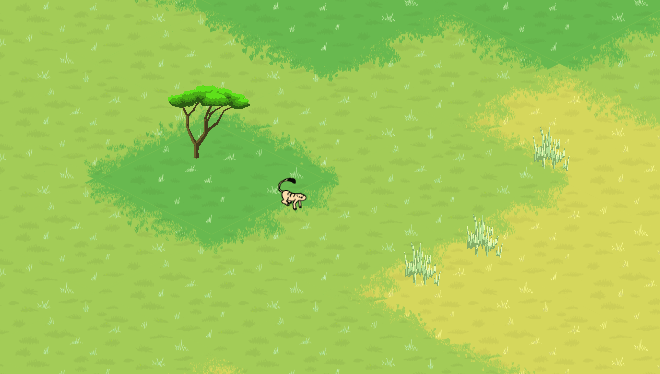
Camera Controls
In Arborlands, you will control one troop of Arborians directly, but will also be able to pan around the map to see the level at large. I was absolutely delighted by how quickly I was able to set up panning and zooming. With a little help from online videos and community posts on camera control I was able to get camera panning and zooming. It all comes down to the built-in camera controls for Unity. The player can now use the WASD keys to move the camera around, or middle click to pan the camera around. Controls are obviously not final at this point.
Thank you for reading, input is welcome!
 Arborlands
1 Comment