

Hello! This is a late dev log, I took a chance to relax a bit over the long 4th of July weekend and as a result I’m publishing on a Wednesday instead of Sunday 😅. I’ll be back to the regular schedule this week!
Summary
- Graphics
- Grass and shrubs that shake when the troop walks through them
- Drew a few trees, reverted to regular shadows
- User Interface – Improved hover and selection behavior for nodes and troops
- Click hierarchy – only one target for hover or click
- No hover effects when dragging objects
- Route UI cleaned up
- Under the hood -18 more unit tests added, mostly in the input manager (mouse clicks and hovers)
Moving plants
I’ll start with the high-visibility stuff. I animated some shrubs and grass to shake when an Arborian passes over them. This is a feature some of my friends suggested a while ago. It’s the kind of thing a player thinks of almost as soon as the see a game and the developer is says “okay, maybe later… like, way… way later…”.
The animation was quite simple, I just took the shrubs and grasses I drew in Adobe Animate and skewed them back-and-forth quickly using a tween. A tween is a technique where you create the beginning frame and the end frame of your animation, and a computer program figures out the motion in between those two points, hence “tween”.
You have to watch yourself with skew tweening, if you overdo it, it can cause a very unnatural warping effect. Luckily for my little shrubs, the motions is so fast that it looks pretty natural.
After the animation was done, I exported it to Unity and attached the animation to the bush/grass. I set up a trigger-collider on the bush/grass so that when an Arborian touches it, it plays the shake animation.
I wasn’t sure if this would play well with folks, but I was really happy to see the response on Twitter. Actually it was the most successful Tweet I’ve had yet, so thanks everyone!!
It’s really super motivating when others see the work and like it 😆.
UI Cleanup
As you saw on last week’s log, I added the ability to manipulate routes by adding nodes on route legs. As you also saw, there were some visual and bugs. So early this week I set about to squash them. I spent a good few days on this because I wanted to develop as many unit tests for this functionality as would be needed to prevent future breaks. This was worth the extra time and made me write more thorough code.
The primary UI problem was that my line colliders and the actual route lines were not aligned. It turned out that I had my base line-objects set to an arbitrary default position, once I set the position to zero on all axes (X, Y, and Z), the problem went away. I was really pleased because this was a really daunting problem that I was not able to figure out for a while!! 😬
The secondary problem was in that the hover-feedback for the route-lines was appearing when it wasn’t relevant to the player. You can see this in the dev vlog video and in the image below: when I drag the node, a “ghost” node appears on the line.
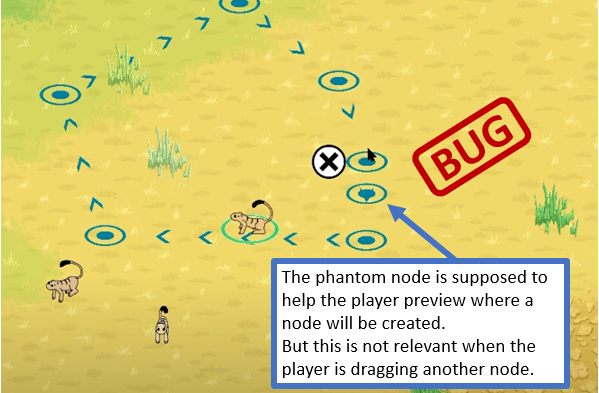
To deal with this issue, there is now a strict hierarchy of objects that applies to both mouse-hovers and clicks. This means that if the player hovers over more than one hover-able object, the highest object on the hierarchy will get the hover effect. The same applies to clicks. Here is the current hierarchy:
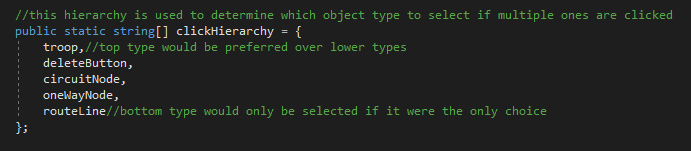
So if you hover over a troop and a route-line at the same time and then click, the troop will be selected and no hover effect will appear for the line. And for good measure, all hover effects are disabled when an object is being dragged.
I have added hover effects for routes and route nodes. Deleting nodes is also more natural now because you can merely hover over the node to make the delete button appear. So deletion now only requires a hover and a click, not two clicks – it’s the small things, right?
Thanks for reading an viewing, I’m planning on another dev log this Sunday. See you then!
 Arborlands